This guide is intended for IT professionals and supports you in independently connecting Q.wiki to Microsoft ADFS.
Recommendations and General Information
Migrating Existing Users
When connecting ADFS, existing Q.wiki users with matching email addresses are automatically migrated. Migrated users are updated with data from Active Directory and will be managed through it from that point on.
Migrated users log in using the Use Enterprise Login button. Login with username and password is no longer possible.
Setting Up an Emergency Account
If Active Directory malfunctions or the secret token expires, only manually created Q.wiki users can log in. For this reason, we recommend adding a manually managed account to the KeyUserGroup. This account must have a valid email address and must not be provisioned via Azure – a generic email address such as "service@…" or "it-support@…" is ideal.
If the token has already expired, read the article 401 Unauthorized – Error Message During User Login.
Provisioning
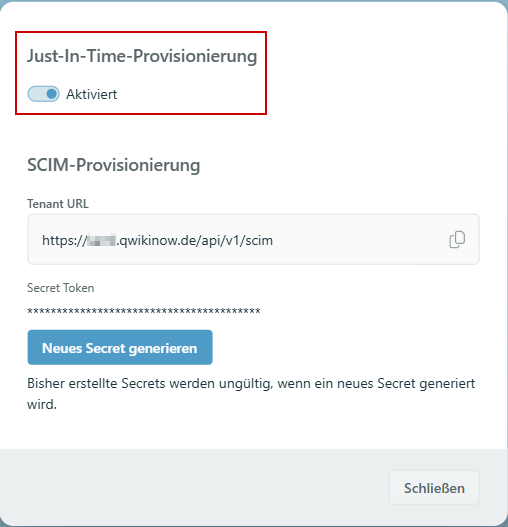
With SAML authentication enabled, just-in-time provisioning is active. User accounts are created automatically in Q.wiki when they log in for the first time.
You can configure provisioning in User Management > 3-Dot Menu > Configure Provisioning:
Setup
- Open User Management and access the IdP SAML Configuration via the 3-Dot Menu.
- Upload your IdP metadata.
- The Q.wiki metadata (Service Provider) is available at https://YOURTENANT.qwikinow.de/saml/sp/metadata. It also contains the certificate.
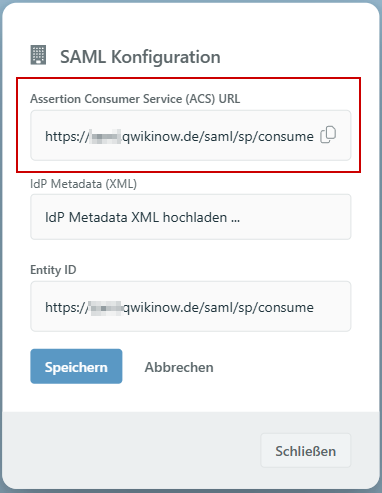
- Copy the ACS URLfrom the Q.wiki dialog and use it in your IdP as the Entity ID and Reply URL:
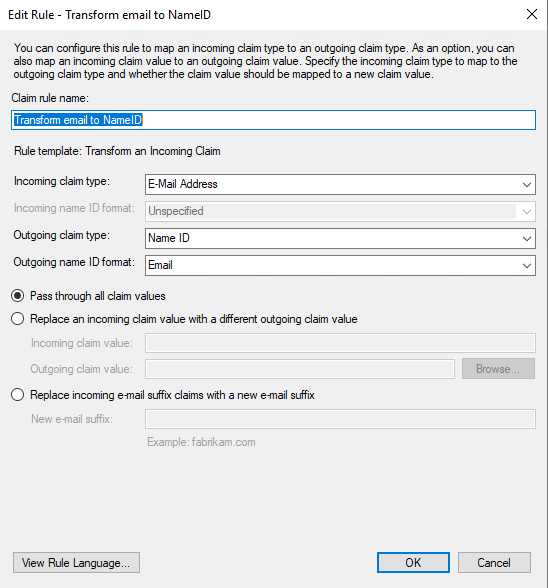
The NameID is expected with the attribute name "email" – this is usually standard, but may require custom mapping in other IdPs. The NameID format is not fixed; we recommend "persistent".
Map the Active Directory attribute for email to "email" and the display name attribute to "name":
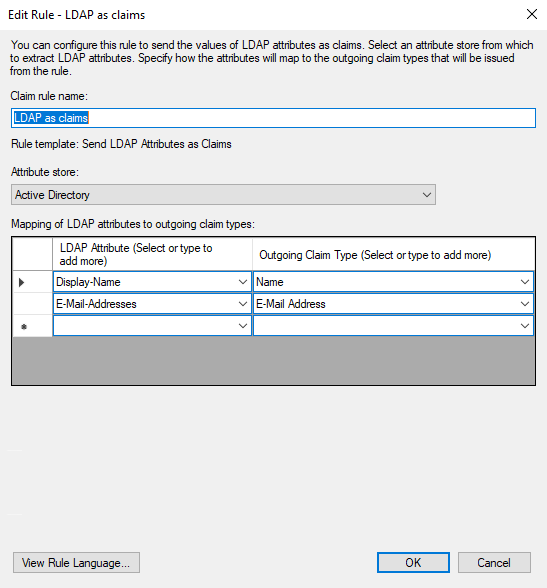
The following example shows how the rules might look:
c:[Type == "http://schemas.xmlsoap.org/ws/2005/05/identity/claims/emailaddress"]
 => issue(Type = "http://schemas.xmlsoap.org/ws/2005/05/identity/claims/nameidentifier", Issuer = c.Issuer, OriginalIssuer = c.OriginalIssuer, Value = c.Value, ValueType = c.ValueType, Properties["http://schemas.xmlsoap.org/ws/2005/05/identity/claimproperties/format"] = "urn:oasis:names:tc:SAML:1.1:nameid-format:emailAddress");
LDAP as Claims:
c:[Type == "http://schemas.microsoft.com/ws/2008/06/identity/claims/windowsaccountname", Issuer == "AD AUTHORITY"]
 => issue(store = "Active Directory", types = ("http://schemas.xmlsoap.org/ws/2005/05/identity/claims/name", "http://schemas.xmlsoap.org/ws/2005/05/identity/claims/emailaddress"), query = ";displayName,mail;{0}", param = c.Value);
Was this article helpful?
That’s Great!
Thank you for your feedback
Sorry! We couldn't be helpful
Thank you for your feedback
Feedback sent
We appreciate your effort and will try to fix the article