This article shows you how to change and transfer page ownership in Q.wiki Now!.
Prerequisites
- You have access rights to the module or page
- The page is in draft or awaiting approval
Step-by-step
1. Select the module or page
Navigate to the module or page whose ownership you want to change.

2. Change owner in the approval workflow
Press the Propose change button of the page. After that Edit. There you'll find the option to select the page owner.
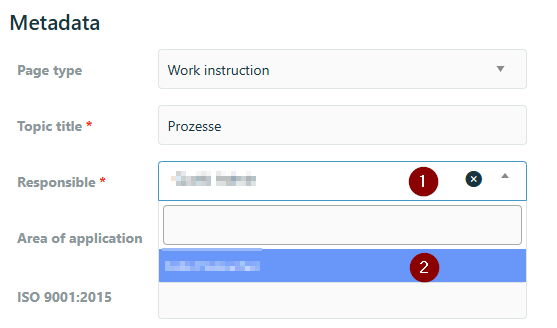
3. Transfer ownership
Enter the new page owner in the change proposal. When the page is approved, this person automatically becomes the new page owner.
Special cases
Important: You cannot change page ownership on multiple pages at once without going through the approval process.
Tip: If the current page owner has left the company and the page is still awaiting content approval, a Key User can complete the approval.
Result
After the page is approved, the new person is registered as the page owner.
Related articles
Was this article helpful?
That’s Great!
Thank you for your feedback
Sorry! We couldn't be helpful
Thank you for your feedback
Feedback sent
We appreciate your effort and will try to fix the article